 Wim, Copandi
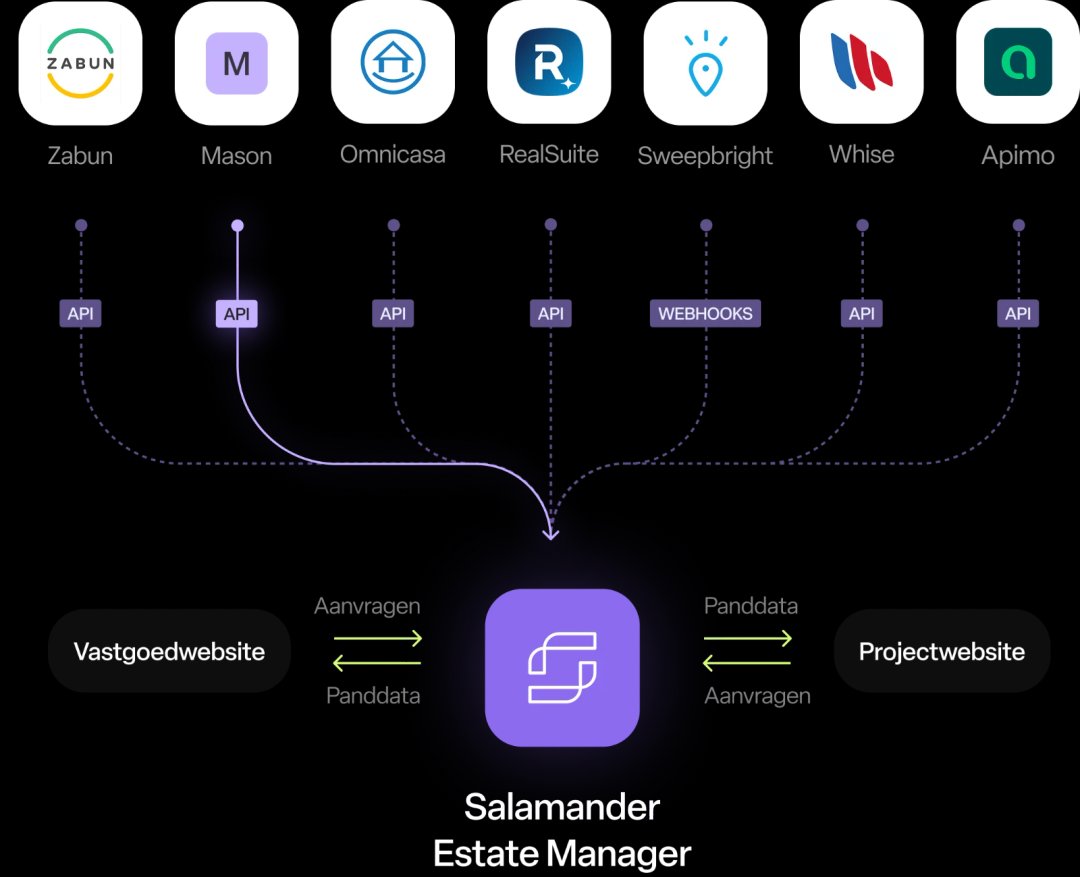
What a CRM integration does
An integration lets your property CRM and your website talk to each other. You manage your listings in one place, and your website always shows what's in your CRM.
Without an integration, you do everything twice. You add a property to your CRM, then again to your website. You change a price and forget the site. Every edit is a chance for a mistake.
With an integration, the double work disappears. It works in two directions:
- From CRM to website. Your listings and your team appear on your site.
- From website to CRM. Every visitor enquiry lands in your CRM.
The second direction is often forgotten. Yet it matters at least as much. A lead stuck in a mailbox is a lead you don't follow up.
What syncs
Everything a visitor needs to know about a property comes from your CRM. You don't have to fill in anything separately on your website.
| What | What you see on your website |
|---|---|
| Properties | Address, price, type, surface areas, rooms, energy data and the description. |
| Photos and documents | Photos in the order of your CRM, plus floor plans and other attachments you publish. |
| Estate agents | Name, photo and contact details of the estate agent linked to the property. |
| Statuses | For sale, to let, under offer, sold or let. |
The status deserves extra attention. A property that has sold but still shows as "for sale" on your site brings calls you'd rather not get. With an integration, the site updates the status as soon as you change it in your CRM.
Sold properties can stay useful too. An overview of what you've sold shows a seller that your agency gets results in their area.
How fast a property goes live
A new property appears on your website automatically. You don't have to do anything, except get the property ready to publish in your CRM.
The integration collects the data at set intervals. How fast that is depends on the integration and on your CRM. In practice, a property appears on your site without you giving it another thought.
If a property is in your CRM but not on your website, check these three things:
- The publication setting. In your CRM, you mark whether a property may go to your website. The name of that setting differs per CRM.
- The status. A property still in preparation usually doesn't go online.
- Required fields. If a price, photo or address is missing, the website may skip the property.
Still can't find it? Ask whoever manages your website. They can see in the integration what came in.
From form to CRM: how a lead arrives
Every enquiry through a form on your website goes to your CRM. You follow it up there, just like a lead from a portal.
It works like this:
- A visitor fills in a form. A question about a property, a viewing request or a request for a valuation.
- The website sends that enquiry to your CRM, with the property attached if it concerns one.
- A contact or lead arrives in your CRM, ready to follow up.
Your estate agent knows straight away which property it's about. And you have all your leads in one place, whether they come from your website or elsewhere.
How to test that all leads arrive:
- Fill in every form yourself. Contact, viewing request, valuation. Check that every enquiry shows up in your CRM.
- Compare the numbers. Put the number of forms sent, from your website statistics, next to the number of leads in your CRM over the same period.
- Check your mailbox. If you get an email from the website but no lead in your CRM, the integration is faltering somewhere.
Pay particular attention to third-party widgets. A valuation tool, a chat or a booking module from another provider often runs on their own system. Those leads then sometimes bypass the integration. They land in a separate mailbox or in that tool's dashboard, not in your CRM. So check for each widget where the leads go.
Which property CRMs in Flanders connect
In Flanders, most agencies work with a handful of property CRMs. A good website partner connects with all of them, not just one.
| Property CRM | Connects with Habbi | Properties and estate agents to your website | Leads to your CRM |
|---|---|---|---|
| Mason | Yes | Automatic | Yes |
| Whise | Yes | Automatic | Yes |
| RealSuite | Yes | Automatic | Yes |
| Zabun | Yes | Automatic | Yes |
| Omnicasa | Yes | Automatic | Yes |
| Sweepbright | Yes | Automatic | Yes |
Habbi connects with all property CRMs, including those not in this table. For everything your CRM can do itself, ask your CRM supplier. They know their own product best.
A general CRM that isn't made for property won't do here. A property website pulls in properties, and those live in a property CRM.
Ask every website partner which CRMs they connect with, and whether that includes the CRM you might use in a few years. Agencies sometimes switch CRM. Your website must cope with that.
Connecting more than one CRM at a time
Some agencies work with two CRMs. Your website can then pull properties from both and send leads to both.
Three situations where this happens:
- A group with several offices, not all using the same CRM.
- A switch to a new CRM, where you run both for a while.
- A separate department, for example for new builds or commercial property, with its own CRM.
Habbi can connect with more than one CRM at a time. Your visitor sees one set of listings on one website. Behind the scenes, it comes from two sources.
It helps when you switch CRM, too. You connect the new CRM, let the old one run a little longer, and switch the old one off once everything has moved over. How to handle a switch like that is covered in a separate article.
What AI does and doesn't write
On Habbi, AI writes the text for your pages and blog posts. It doesn't write your property descriptions. Those come unchanged from your CRM.
That's deliberate. A property description is your text. You or your estate agent know the property, and you're responsible for what it says. That text is already in your CRM and goes to the portals too. Your website shows exactly the same.
The AI does write the rest of your website. Think of your page about selling, your team page or a blog post about a new neighbourhood. The AI bases those texts on a context we build with you at the start: who your agency is, where you work, how you speak.
That keeps your property information accurate and under your control. And your website grows without you writing every page yourself.
Widgets versus your own property pages
Not every integration is the same. Some websites show listings through a third-party widget or iframe. Others make a page of its own on your website for each property.
To your visitor, they sometimes look alike. For Google and AI search engines, the difference is big.
| Widget or iframe | Your own property pages | |
|---|---|---|
| Where the property lives | On a third party's system | On your own website |
| Findable in Google and AI search engines | Not as a page of your site | Yes, every property has its own page |
| Own address per property | Often not | Yes, to share and link to |
| Leads | Sometimes via the third party's system | Via your own form to your CRM |
Listings in a widget don't appear as pages of their own in Google and AI search engines. Someone searching "apartment for sale" in your municipality won't find those properties on your site. With your own property pages, they will.
Habbi makes a page of its own for every property, with structured data. That's code telling Google and AI search engines that it's a property, with a price, an address and a type. Habbi also builds search pages per type and municipality, such as "apartment for sale in Hasselt".
Also read